10Plus The Brain Game {Educational App Review}

With a first grader in my house, we are no strangers to math drills. We have been practicing addition math facts every night and the novelty is wearing off quick. Our flash cards are losing their luster and I am in desperate need of a new way to inspire my daughter to practice her math skills.

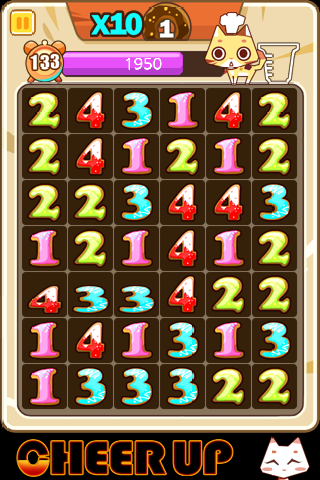
I was happy to learn of this new iPhone App, 10Plus The Brain Game, that may be the solution to our problem.  The game is similar to word search but with numbers!  Simply scan the grid for a combination of numbers which add up to ten, drag your finger across the numbers and watch them disappear as you gain points.  Once this skill is mastered, you can increase the difficulty adding to 20, 30 or even 60.

I tried the game first before introducing it to my daughter.  I thought the graphics were fun and the game was addictive.  When my daughter first tried the game, she had some trouble because she is only used to adding two numbers at a time (instead of a series of numbers).  Fortunately, she did not get frustrated and continued to try the game.  She is getting better at it, and I like that the game will give her a hint if her time takes too long.  I am hoping that this game will help her improve her speed when performing math drills because there is no time to count on your fingers!  I do think this game is perfect for kids around the 3rd grade level.

Want to learn more?  Watch the video demonstration of 10Plus The Brain Game!

This post is the opinion of the Experimental Mommy.  While I was compensated for my time, all opinions remain 100% mine.

Zulily Offers Daily Deals on the Go with iPhone App {Giveaway}

Busy Mom?  Love to shop?  Love a good deal?  If you answered yes, run and download the free Zulily iPhone app!  Zulily, a daily deal website offering great discounts (up to 90% off!) on products for Moms, babies and kids, has gone mobile allowing busy Moms to shop from the comfort of bed, the carpool line, the kitchen….just about anywhere!

Each day, Zulily offers fifteen exclusive deals typically ranging from 50-90% off from up and coming boutique brands.  I have found some great deals on outerwear for kids, shoes for me and back to school supplies, too.  The only problem is that items do sell out and you get the best selection when you purchase early.  As an on the go Mom, sometimes I miss the start of the sale event and miss out on the daily deal I had my eye on.  But, with the launch of the Zulily iPhone app, I can be connected no matter where I am!

“Millions of busy moms shop Zulily’s site regularly to discover the best brands and hottest styles for their family at the lowest prices, but they are typically on-the-go,” said Darrell Cavens, founder and CEO of Zulily. “With the iPhone app, moms can take a quick peek at the day’s sales from anywhere, at anytime and never miss out on a great deal from Zulily or their favorite brand.”

Now, it’s easier than ever to shop online at Zulily!  Not only can you see daily deals for today, but you can preview the ones to come and even set reminders for the sales you do not want to miss.  With round the clock deals and one-time shipping, you can buy an item during a morning sale and have it shipped with an item you purchase that evening paying only one standard shipping rate.  Invite friends to Zulily and get a $15 credit when their first order ships!

Check out the app and download it for free at the iTunes store now!

GIVEAWAY

Want to check out the magic of Zulily?  One reader will win a $25 credit to Zulily to start shopping now!

How to Enter:

1.  Check out the products offered by Zulily and tell me how you would spend your $25 credit!

Additional entries:

1. Blog about this giveaway and link to The Not-So-Blog and Zulily (10 extra entries).

2. Follow me (@BridgetteLA) and @Zulily on Twitter and Tweet this giveaway. Every time you tweet you get an additional entry! Limited to 10 a day, please. (You must have over 50 Twitter followers to qualify for unlimited entries!)

3. Subscribe to my blog.

4.  Download the free Zulily iPhone app and let me know you did.

4. Become a Fan of The Not-So-Blog and Zulily on Facebook.

5. Place my blog button on your sidebar.

Contest ends at 11:59pm CST on September 9th.  Prizes not claimed in 72 hours will be forfeited. Open to U.S. only.

This post is the opinion of The Experimental Mommy.  No compensation was received for this post.   All opinions remain 100% honest.

Wanna Play? Make Plans with RedRover iPhone App!

As a Mom who works full time outside the home, I have GOT to be organized. I cherish the quality time I have with my two children and try my best to make the most it. Making plans with family and friends is essential but can prove to be difficult for a family on the go. Enter RedRover! I think I have found my new best friend.

What is RedRover?  It’s a FREE app for iPhone and Droid that will make your life 10X easier.  Check out the video below for a full tour!

RedRover from RedRover on Vimeo.

After watching the video, I couldn’t have been more excited to try it out!  I started by downloading the free app to my iPhone and inviting my contacts.  You can easily add friends from your phone or email address books and even create groups of friends for more organization.  For example, I will be attending the blog conference, BlogHer, next month in San Diego so I created a group on friends I want to make sure I connect with while I am there.

Time to play!  Want to meet up with some friends at a local pizza place?  RedRover allows you to tell your friends you are there and invite them to join you for a fun playdate.  Or you can make plans for a future date, instead.  Invite one friend or your entire playgroup in a few easy steps! While I love the social aspect of RedRover (you can even Tweet and Facebook directly from the app), I see myself using this app for different reasons.

My Favorite RedRover Features:

  • Finding Clean Bathrooms: As a Mom of two daughters, I cannot tell you the countless times that we have been out and about and had to find a potty quickly.  With a simple request to RedRover, a list of the closest and cleanest potties are quickly available.  Great for road trips, too!
  • Finding Medical Care: Unfortunately, on our last few vacations, we have made at least one trip to a local ER or Urgent Care.  Finding medical care when you are out of town can be stressful!  RedRover quickly finds the closest hospital and even has the phone number and map to help you get there.
  • Emergency Contacts: You can set up five emergency contacts that you can contact all at once in case of an emergency.  I hope I never need this feature, but it is nice to have this safety net.
  • Quick Conversations with your Friends: The ability to quickly send a message to my friend without having to create an email or text message is a pretty neat feature.  Similar to instant messaging.
  • Have I mentioned that it’s FREE?!?

I have found many uses for RedRover in my busy life after using it for only a short time.  I can’t wait to introduce more of friends to the free app.  And the best part?  If you download the app before July 28th, RedRover will donate $1 for every app downloaded to Christy Turlington’s charity, Every Mother Counts (up to $20,000)!

Get Ready, Get Set….PLAY!

This post is the opinion of the Experimental Mommy.  While I was compensated for this post as a RovingMom Ambassador, all opinions remain 100% my own.

Similac StrongMoms Baby Journal iPhone App: Review

babyIn 2005, I became a Mother for the first time.  Because Motherhood was so new to me, I was meticulous about recording my baby’s every move including feedings, diaper changes and naps.  I carried a journal in my diaper bag so I would not miss a thing even when we were on the go.  A little neurotic?  Maybe. But for my scientific brain, the input and output of my baby was like data that must be recorded!

Recently, Similac released an iPhone app that would have made life so much easier!  This free app allows you to make note of feeding (both bottle and breast), diaper changes, nap times and growth measurements.  The app even creates trend charts so you can easily identify developing patterns allowing you to predict your baby’s needs.

The hardest thing for me to remember when I was nursing was with which breast I had started.  Fortunately for new breastfeeding Moms, the app allows you to track which side you began with and how long the baby fed.  I know my daughter preferred the right side, so I did work hard to get her to take the left as well.  You can record how long the baby goes between feedings and detailed descriptions of what comes out.  Trust me, I never thought I would dissect what comes out of my baby, but if the doctor wants to know, you need the info at your fingertips!

I think the best part of the app is that your findings can be emailed directly to your pediatrician or family.  I know in the beginning, I was concerned that my baby wasn’t eating enough and this app would have been a great way to communicate my findings to our pediatrician.  Pulling out an iPhone would have been so much easier than fumbling with a bulky journal.  What a peace of mind!

Keeping organized made me feel like I had some control over the new little one in my home (however false that may have been), but admittedly, it was hard when you were sleep deprived.  I can’t imagine keeping track of more than one baby at a time!  Two of my friends had sets of twins, so I can only imagine how helpful the Similac StrongMoms Baby Journal would have been to them.  You can track more than one baby at a time and even upload a picture to keep the records straight!

Whether you are breastfeeding or bottle feeding, new Mom or Mom of five, the Similac StrongMoms Baby Journal can help you stay organized so you don’t miss a thing!  Did I mention it’s FREE?

This review is the opinion of the Experimental Mommy.  Others may have a differing opinion of the product.  The Similac iPhone app is free for all, however I was compensated for my time from Collective Bias.  All opinions remain 100% mine.

Sprout Pregnancy Essentials iPhone App: Review

When my husband and I decided it was the right time to start a family, we tried for what seemed like FOREVER to get pregnant (in actuality it was eight months).  When I learned I was indeed pregnant with my first child, I was elated, overjoyed, thankful and….scared.  I became attached to any book that had information on what to expect in the next nine months and beyond.  Being a science geek, I absolutely loved reading about the changes that were happening to both me and my baby and being a control freak, I also attached myself to a journal where I kept questions, appointments and baby names.

01a-mybabyNow, with the invention of the iPhone, applications are being developed to make just about anything easier and more fun!  The smart people over at Med ART Studios have just released a new iPhone App called Sprout Pregnancy Essentials.  This new app has everything for the Mother to Be!  Some key features:

Lifelike Fetal Imagery and Exploring in 3D:  Anatomically correct amazing fetal images by week of pregnancy.  First iPhone app to incorporate 3D rotating images of your growing baby!

Week by Week Advice:  Comprehensive weekly advice written by medical doctors
Prepare for your Doctor Visits:  Gives you a place to store your questions for your next doctor’s visit!

Pregnancy Checklist:  Make sure you have everything packed in your hospital bag and everything you need stocked in your baby’s new nursery!

Kick Counter, Contraction Timer and Weight Tracker:  Keep track of all the necessary statistics!

To have all of this information at my fingertips would have been a dream come true for me!  If you have an iPhone, check out this great new pregnancy app or recommend it to a friend! Sprout Pregnancy Essentials can be downloaded for only $9.99!  Have questions?  Check out their Facebook page for the latest news!

This is a sponsored post on behalf of Sprout Pregnancy Essentials, however all opinions remain 100% my own.